
There are cases where a counting task requires the counter to search for a missing UID in a particular bin; this is referred to as an investigation task that stems from count issues discovered in the main counting task. The Missing UIDs task allows a counter to record finding (or not finding) missing UIDs during the inventory counting process.
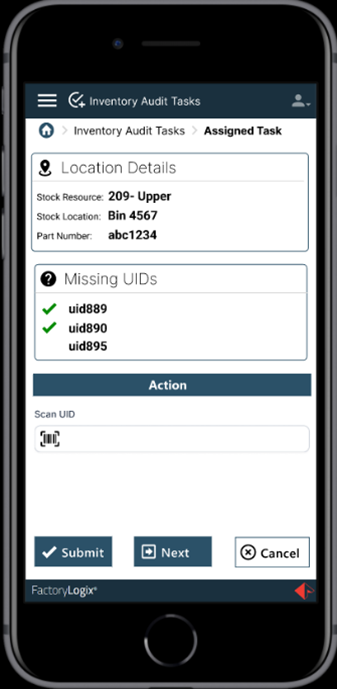
The counter must go to the bin assigned in the task and look for the UID in that location. Once found, the counter scans the UID to confirm they found it. (Alternatively, a counter can scan every UID and allow the system to identify that the missing UID was found.)
The Missing UIDs area of the screen displays all UIDs that were reported as missing by the initial task. The location details including Stock Resource, Stock Location and Part Number are populated from the details of the investigation to guide the counter where to search for the missing UIDs.