
FactoryLogix Materials Management verfügt über leistungsstarke Funktionen zur Bestandsprüfung, die Sie bei der Abwicklung des gesamten Prozesses für verschiedene Arten von Bestandsprüfungsplänen unterstützen.
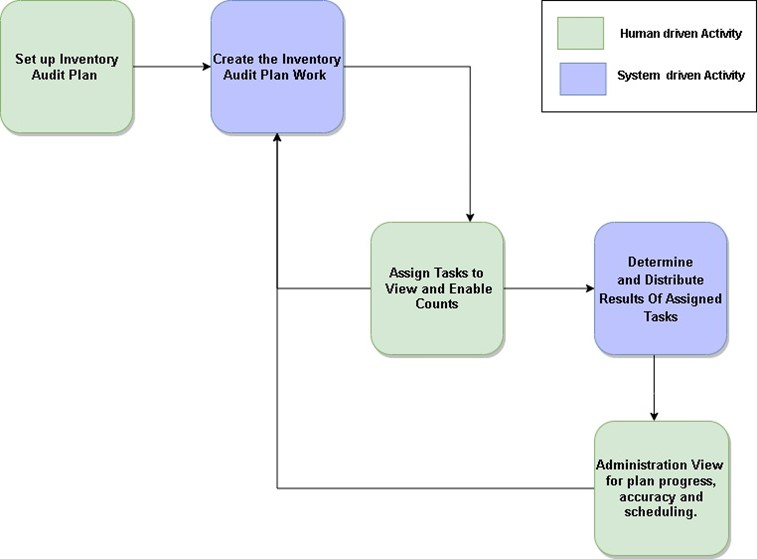
Der Bestandsprüfungsprozess in FactoryLogix umfasst fünf Funktionsbereiche; die folgende Abbildung zeigt diese Bereiche, ihre Position im Planungsprozess der Bestandsprüfung sowie ihre gegenseitigen Zusammenhänge.
-
Bestandsprüfungsplan einrichten – Dieser Funktionsbereich umfasst die Erstellung und Pflege der Bestandsprüfungspläne sowie der zugehörigen Planeigenschaften.
-
Bestandsprüfungsplan erstellen – Dieser Funktionsbereich umfasst das Systemverhalten beim Anlegen, Ändern oder Aktivieren eines Bestandsprüfungsplans. Basierend auf den von Ihnen angegebenen Details werden Daten an die verschiedenen Funktionsbereiche gesendet, um die Prüfungsaufgaben auszuführen und die Pläne sowie die Zählergebnisse dieser Aufgaben zu überwachen.
-
Zuweisung von Aufgaben zur Anzeige und Freigabe von Zählungen – In diesem Funktionsbereich hat der Zähler einen Überblick über alle zugewiesenen Zählsitzungen, die mit den digitalen Zählkarten oder den Bildschirmen zur Zählausführung verknüpft sind, über die der Zähler die Zähldaten eingeben kann.
-
Ermittlung und Verteilung der Ergebnisse zugewiesener Aufgaben – Dieser Funktionsbereich umfasst die Reaktion des Systems, wenn ein Zähler Aufgabenergebnisse eingibt. Auf der Grundlage der Vergleiche zwischen den Ergebnisdaten und dem aktuellen Bestand ermittelt das System die Ursache etwaiger Abweichungen, die ein Bestandsplanmanager bis zur Klärung überwachen kann.
-
Verwaltungsansicht für Planfortschritt, Genauigkeit und Zeitplanung – In diesem Funktionsbereich kann ein Manager den Fortschritt des gesamten Bestandsprüfungsplans sowie den Fortschritt und die Ergebnisse aller Zählaufgaben eines Plans einsehen und feststellen, was möglicherweise angepasst, geklärt oder weiter eskaliert werden muss.
Hinweis
Ein Zähler ist eine Person, die Lagerartikel entweder manuell oder durch Scannen der UIDs (Barcodes) der Lagerartikel zählt.