
Inventory Audit Tasks window
When an audit plan reaches its scheduled start date, it becomes active.
The tasks associated with an audit plan dislay in the Inventory Audit Tasks window for each counter (person) who was added to the plan during setup when each interval in the plan reaches the interval start date.
To see tasks in the Inventory Audit Tasks window, you must be assigned as a counter for the associated audit plan.
As a counter, when you select the Inventory Audit Tasks command from the left side of the Materials Management window, you see a view of all your assigned tasks.

Note
Each counter only sees the active tasks assigned to them; when those tasks are completed, the tasks are removed from the counter’s view.
Note
The minimal view for a counter’s assigned tasks is based on a mobile device since most counters typically use a mobile device when counting inventory on the warehouse floor.
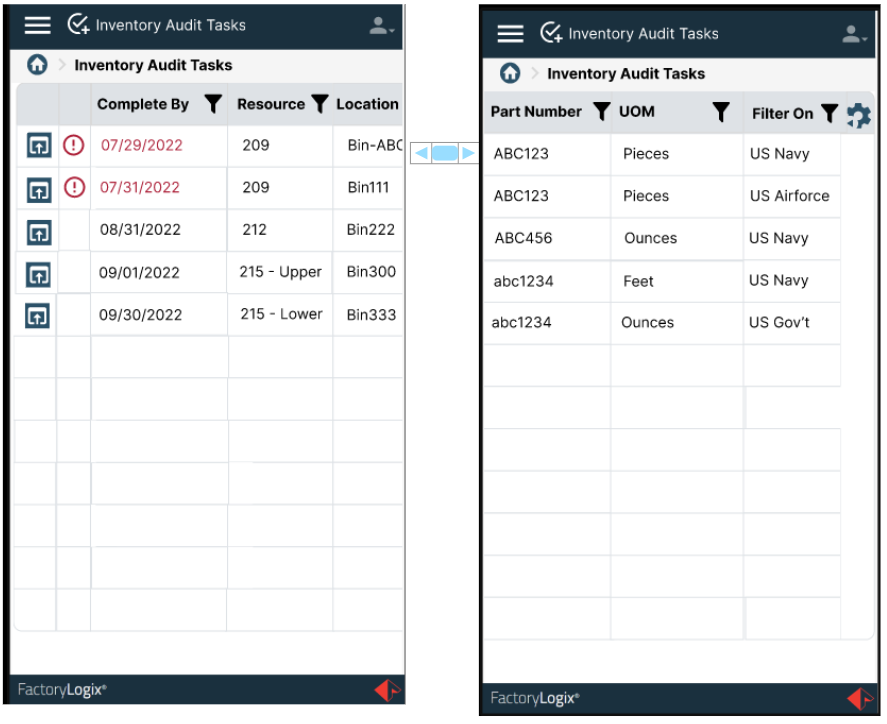
The following table describes the column data a counter sees in the Inventory Audit Tasks window.
Item | Description |
|---|---|
Unlabeled open column | This column display an Open icon for each row that when selected will open the task for that row. In some cases, it may show an icon warning for task urgency if the task qualifies as an urgent/high priority task. |
Complete By | The last date planned for the current inventory count session. Important If the count has not been completed by this date, the text will display in bold Red. For initial counters, the Complete By date is determined using the first day of the current interval and the Primary Count Time Period value:
|
Resource | The warehouse or stock room/ID defined by the organization. |
Location | The specific slot location within the stock resource. |
Part Number | The number associated with the part. |
UOM | The unit of measure associated with the part. |
Owner | The owner of the part, bin, or UID. |

Bin-based and part number-based counting tasks
When executing bin-based counting tasks and a bin contains multiple part numbers, each bin and part number combination has its own entry in the list for the counter.
When executing a part number-based counting task and a part number is in multiple bin locations, each part number and location combination has its own entry in the list for the counter.
Both cases above are counting UIDs with quantity (serialized inventory) or just quantity (non-serialized inventory).
Important
If multiple tasks for a bin or a part number are created, the system groups the assignment of those tasks to one person.
Priority Count Task column
Additional count tasks are generated when there is a value greater than zero defined for Additional Counts in the plan setup (Audit Planning tab) and a count discrepancy was recorded for a task that is already completed. A different counter than the initial/previous counter is assigned to the priority task which is labeled in the list with an exclamation point icon to a) distinguish it from initial counts and b) mark it as a priority in the list. This type of task assignment is initiated by the results of counter actions.