
administrator on-premise only
After upgrading the software and database, you are ready to reconfigure the server services with the logon accounts they used before the upgrade.
-
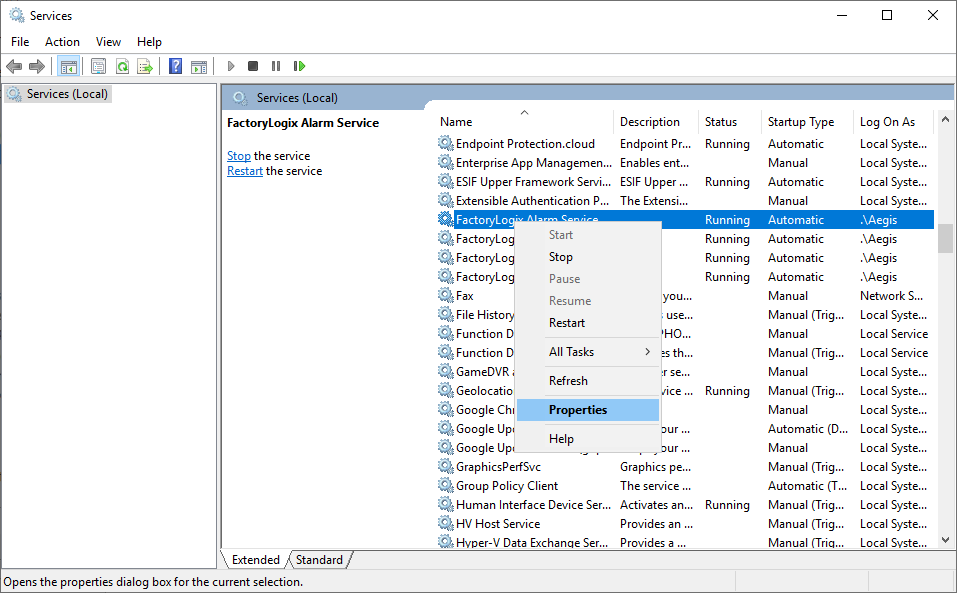
Select Start > Services. (To open the Services snap-in in Windows Server 2012, click *Start , enter services.msc.)
-
Right-click a FactoryLogix service you identified in the Record service account logon settings topic, then select Properties.
-
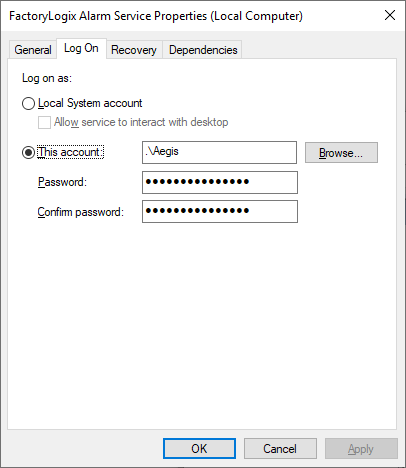
Select the Log on tab.
-
Select This Account.
-
Select the Browse button, locate and select the previously-recorded account, then select OK.
-
Enter the password for the selected account in the Password and Confirm password fields, then select OK.
-
Repeat Steps 1-6 for each FactoryLogix service that previously had a logon account other than Local System specified before you upgraded the FactoryLogix system.