
Einen SQL-Agent-Auftrag erstellen, um nach neuen Artikeln zu suchen
Die SQL-Replikation repliziert Artikel (Tabellen, Ansichten usw.) nicht automatisch. Daher müssen Sie einen SQL-Agent-Job einrichten, der regelmäßig nach Ergänzungen sucht, die möglicherweise durch ein FactoryLogix-Upgrade des Datenbankschemas entstanden sind.
Starten Sie SQL Server Management Studio (SSMS) als Administrator und stellen Sie eine Verbindung zum FactoryLogix-Datenbankserver (Produktionsdatenbankserver) her.
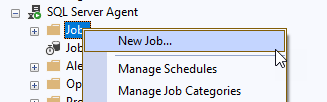
Erweitern Sie den Ordner SQL Server Agent, klicken Sie mit der rechten Maustaste auf Jobs und wählen Sie dann Neuer Job.
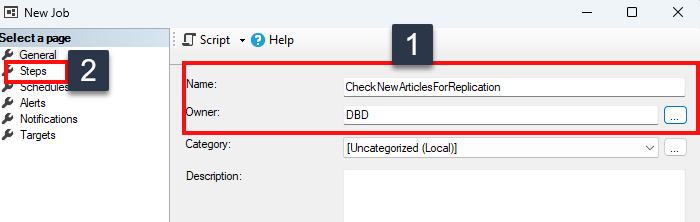
Geben Sie einen Namen für den Job ein (z. B. CheckNewArticlesForReplication), legen Sie den Eigentümer als den zuvor erstellten dbo-Benutzer fest (SQL-Transaktionsreplikation konfigurieren | Create-Windows-accounts-for-replication) und wählen Sie dann Schritte auf der linken Seite des Fensters aus.
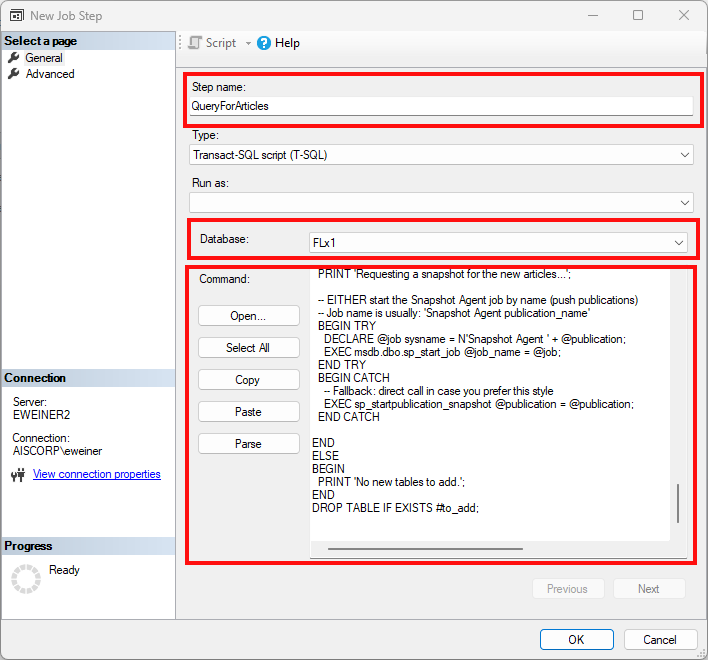
Wählen Sie auf der Seite Schritte die Option Neu und geben Sie dem Schritt einen Namen (z. B. QueryForArticles).
Wählen Sie in der Dropdown-Liste Datenbank die FactoryLogix-Produktionsdatenbank aus, kopieren Sie die Abfrage und fügen Sie sie ein (Einen SQL-Agent-Auftrag erstellen, um nach neuen Artikeln zu suchen | SQL-Query-for-job-creation-to-find-new-articles).
Ersetzen Sie den Text ENTER PUBLICATION NAME HERE durch den Namen der Publikation im Abschnitt Befehl und wählen Sie anschließend OK.
Wählen Sie auf der linken Seite des Fensters Zeitpläne aus und klicken Sie dann auf Neu.
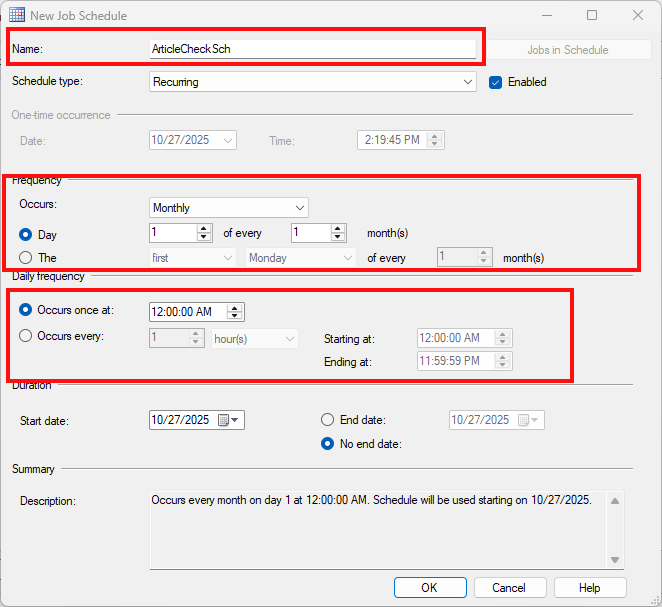
Geben Sie einen Namen für den Zeitplan ein (zum Beispiel ArticleCheckSch).
Stellen Sie im Dropdown-Menü Wiederholung die Option Monatlich ein, wählen Sie einen Tag im Monat aus, an dem die Aufgabe ausgeführt werden soll, legen Sie die Uhrzeit an diesem Tag fest, zu der die Aufgabe ausgeführt werden soll, und klicken Sie dann auf OK.
Klicken Sie auf OK, um Ihre Auswahl zu bestätigen.
FactoryLogix-Funktionen unter Verwendung der Berichtsdatenbank
iMonitor/Dashboards
DataMiner/Berichtsdesigner
Alle Berichtsdienste
Berichtserstellung/Arbeitsmappe
Berichtsplaner
Abfrageausführung
SQL-Abfrage zur Erstellung eines Jobs zum Auffinden neuer Artikel
/* === PARAMETERS TO SET === */

DECLARE @publication sysname = N'ENTER PUBLICATION NAME HERE';
DECLARE @schema      sysname = N'dbo';           -- or a dedicated schema like 'ops'
DECLARE @preCreation nvarchar(10) = N'drop';     -- what to do at subscriber if table exists: keep/drop/truncate/none

/* === FIND NEW TABLES NOT YET PUBLISHED === */
;WITH pubs AS (
  SELECT pubid FROM syspublications WHERE name = @publication
),

candidates AS (SELECT
                T.object_id,
                S.name + N'.' + T.name [TWO_PART],
                S.name [SOURCE_OWNER],
                T.name [SOURCE_OBJECT],
                'logbased' [typ]
                FROM sys.tables T
                JOIN sys.schemas S ON S.schema_id = T.schema_id
                CROSS JOIN pubs
                LEFT JOIN sysarticles A ON A.objid = T.object_id
                    AND A.pubid = pubs.pubid
                WHERE A.artid IS NULL              -- not yet published
                    AND S.name = @schema             -- limit to chosen schema
                    AND T.is_ms_shipped = 0
                UNION ALL
                SELECT
                V.object_id,
                S.name + N'.' + V.name [TWO_PART],
                S.name [SOURCE_OWNER],
                V.name [SOURCE_OBJECT],
                'view schema only' [typ]
                FROM sys.views V
                JOIN sys.schemas S ON S.schema_id = V.schema_id
                CROSS JOIN pubs
                LEFT JOIN sysarticles A ON A.objid = V.object_id
                    AND A.pubid = pubs.pubid
                WHERE A.artid IS NULL
                    AND S.name = @schema
                    AND V.is_ms_shipped = 0
                UNION ALL
                SELECT
                P.object_id,
                S.name + N'.' + P.name [TWO_PART],
                S.name [SOURCE_OWNER],
                P.name [SOURCE_OBJECT],
                'proc schema only' [typ]
                FROM sys.procedures P
                JOIN sys.schemas S ON S.schema_id = P.schema_id
                CROSS JOIN pubs
                LEFT JOIN sysarticles A ON A.objid = P.object_id
                    AND A.pubid = pubs.pubid
                WHERE A.artid IS NULL
                    AND S.name = @schema
                    AND P.is_ms_shipped = 0
                UNION ALL
                SELECT
                O.object_id,
                S.name + N'.' + O.name [TWO_PART],
                S.name [SOURCE_OWNER],
                O.name [SOURCE_OBJECT],
                'func schema only' [typ]
                FROM sys.objects O
                JOIN sys.schemas S ON S.schema_id = O.schema_id
                CROSS JOIN pubs
                LEFT JOIN sysarticles A ON A.objid = O.object_id
                    AND A.pubid = pubs.pubid
                WHERE A.artid IS NULL
                    AND S.name = @schema
                    AND O.is_ms_shipped = 0
                    AND O.type = 'FN'
)

SELECT * INTO #to_add FROM candidates;

IF EXISTS (SELECT 1 FROM #to_add WHERE #to_add.typ = 'logbased')
BEGIN
  DECLARE @source_owner sysname, @source_object sysname, @article sysname, @type sysname, @cmd nvarchar(max);

  DECLARE cur CURSOR FAST_FORWARD FOR
    SELECT source_owner, source_object, two_part, typ FROM #to_add;

  OPEN cur;
  FETCH NEXT FROM cur INTO @source_owner, @source_object, @article, @type;

  WHILE @@FETCH_STATUS = 0
  BEGIN
    PRINT CONCAT('Adding article ', @article, ' ...');

    EXEC sp_addarticle
      @publication        = @publication,
      @article            = @article,          -- article name; two-part keeps it readable
      @source_owner       = @source_owner,
      @source_object      = @source_object,
      @type               = @type,
      @description        = NULL,
      @creation_script    = NULL,
      @pre_creation_cmd   = @preCreation

    -- If you need row filters, add sp_articlefilter here.

    FETCH NEXT FROM cur INTO @source_owner, @source_object, @article, @type;
  END

  CLOSE cur; DEALLOCATE cur;

  PRINT 'Requesting a snapshot for the new articles...';

  -- EITHER start the Snapshot Agent job by name (push publications)
  -- Job name is usually: 'Snapshot Agent publication_name'
  IF EXISTS (SELECT 1 FROM #to_add WHERE #to_add.typ = 'logbased')
  BEGIN TRY
    DECLARE @job sysname = N'Snapshot Agent ' + @publication;
    EXEC msdb.dbo.sp_start_job @job_name = @job;
  END TRY
  BEGIN CATCH
    -- Fallback: direct call in case you prefer this style
    EXEC sp_startpublication_snapshot @publication = @publication;
  END CATCH

END
ELSE
BEGIN
  PRINT 'No new tables to add.';
END
DROP TABLE IF EXISTS #to_add;