
Upgrade database schemas
ADMINISTRATORON-PREMISE ONLY
Upgrading FactoryLogix to a newer version may involve required database schema changes. As the schema of the production database is updated, FactoryLogix does not apply those changes automatically to a connected reporting database.
To ensure the reporting (replicated) database remains synchronized with the production database, schema changes must also be replicated from the publication to the subscription database. This replication of schema changes is managed by SQL Server and controlled through a setting in the publication database’s properties.
Enable or confirm schema change replication
While running SQL Server Management Studio (SSMS) as an Administrator, connect to the FactoryLogix database server (production database server).
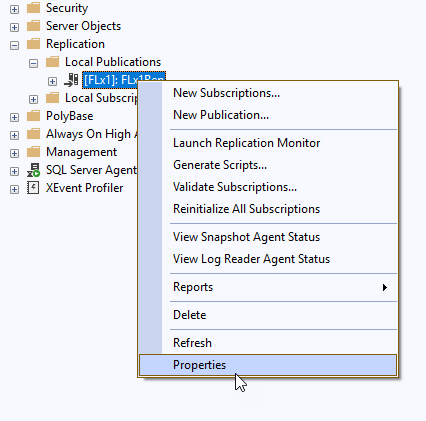
Expand the Replication folder, expand the local publications folder, right-click the FactoryLogix publication, then select Properties.
Select Subscription Options from the Select a Page toolbar and navigate to the Schema Replication area.
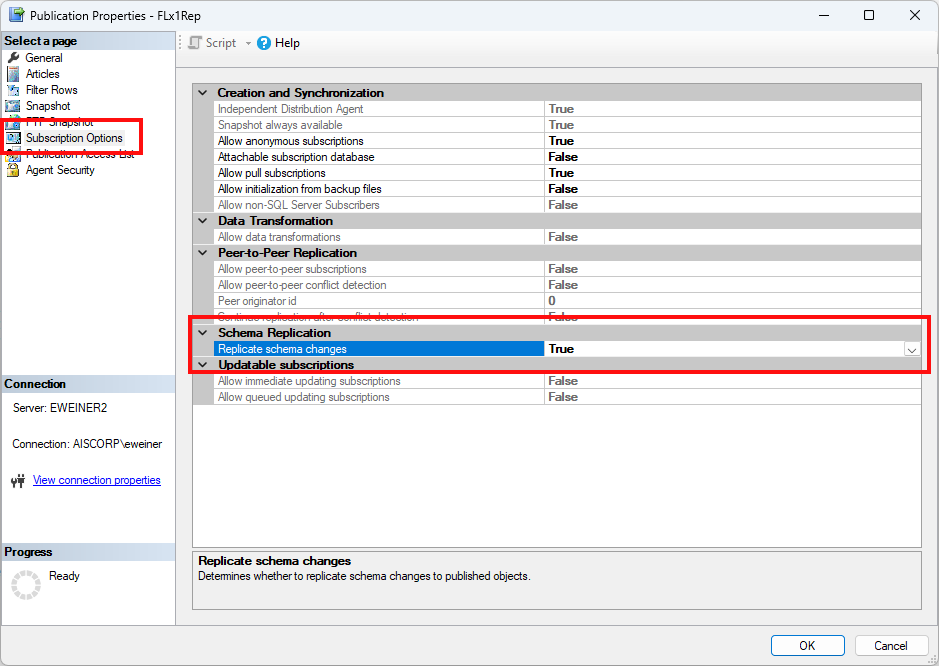
Set (or confirm) the setting for Replicate schema changes to True.
Select OK to save the properties.