
Entra ID in FactoryLogix
ON-PREMISE ONLY
Sign in with Microsoft button
A Sign in with Microsoft button displays on the FactoryLogix login screen after your administrator configures the required Microsoft settings. When you select this button, a Microsoft-hosted login dialog displays, allowing you to authenticate using your existing Microsoft credentials.

Note
The Sign in with Microsoft button is only visible after your administrator configures the Tenant ID and Client ID in the FactoryLogix Global Options.
Microsoft Account user type
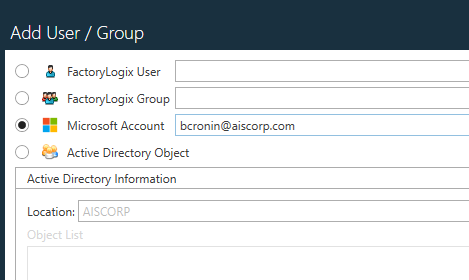
A new Microsoft Account user type is available in FactoryLogix for on-premise deployments. This user type is designed for organizations that manage identities through Microsoft and want to extend that authentication into FactoryLogix.
Key behaviors of Microsoft Account users
User profiles are managed by Microsoft—not within FactoryLogix. Fields such as first name, last name, and phone number are populated automatically and updated each time you log in.
Note
Microsoft Account users cannot be edited manually inside FactoryLogix. A notice is displayed on the user profile to indicate this.
Both Microsoft Account users and standard FactoryLogix users can coexist in the same installation.
Two-factor authentication (2FA)
Microsoft Account sign in supports two-factor authentication (also referred to as 2FA). Two-factor authentication enforcement is managed through your organization's Microsoft tenant settings and carries over to FactoryLogix automatically .