Create an opportunity count methodology
By default, FactoryLogix has one opportunity methodology defined and it is configured to match the methodology as defined by IPC 7912. You should create a new opportunity methodology that mirrors the IPC 7912 definition.
The Oportunity Methodology tab is where you need to configure the first items to generate correct DPMO results from FactoryLogix.
Log into FactoryLogix Office.
Select Templates and Standards
 > Define Quality Standards.
Select the Opportunity Methodology tab.
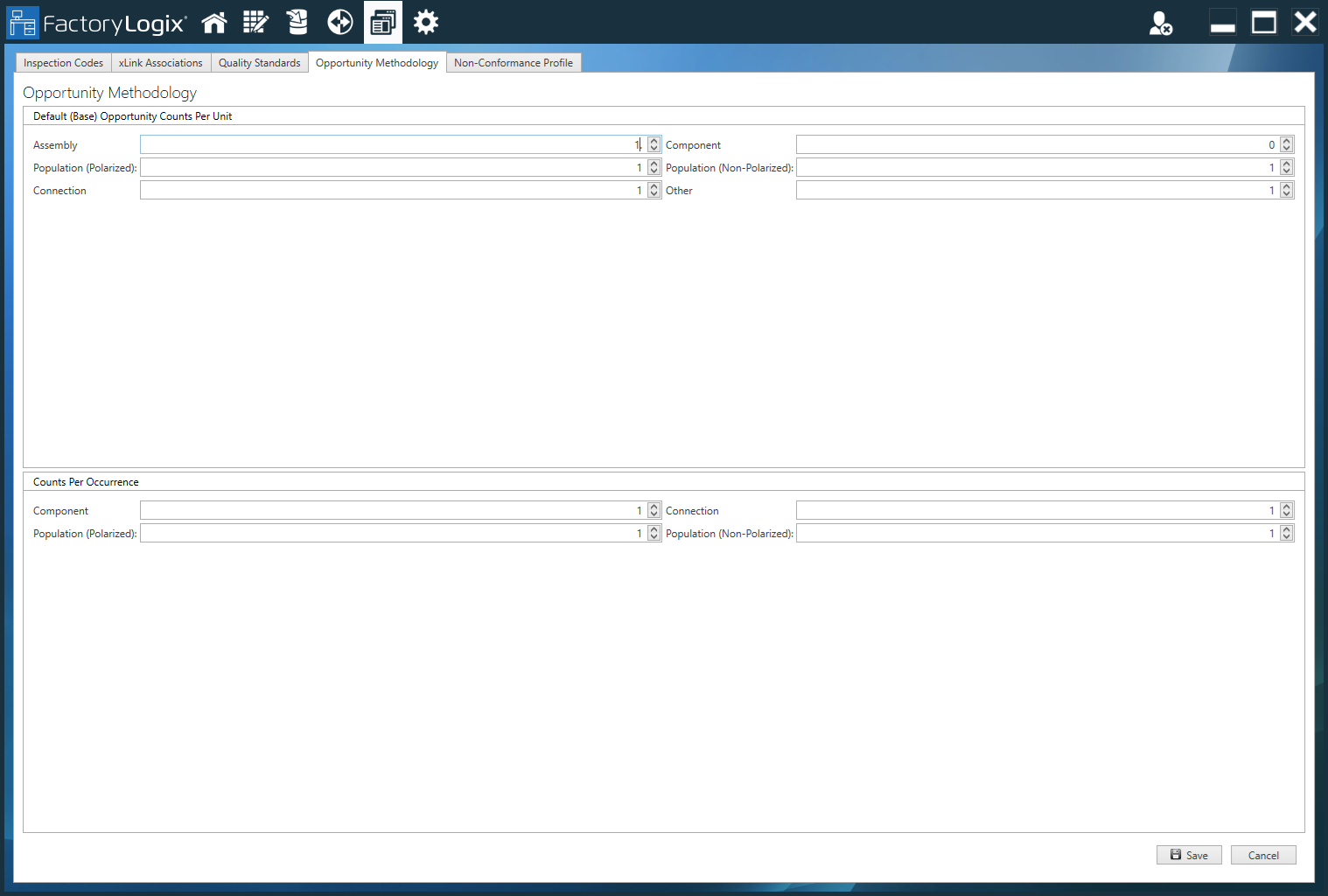
The following table describes the available base opportunity counts per unit.
Default (Base) Opportunity Counts Per Unit | Description |
|---|---|
Assembly – This opportunity type is assigned to any operation where an assembly is actually handled by a person or machine. | The Assembly field has an opportunity count of 1 defined. This will count one opportunity for each operation that has the Assembly opportunity count selected. This value of 1 is correct per IPC 7912/9261. |
Component – This opportunity type is assigned to any operation where components are added to the assembly. This operation type is typically named Component Population or something similar (it is the operation type that has been designated as the Population operation for the process). | The Component field has an opportunity count of 1 defined for each occurrence. This means that for each occurrence of that component there is 1 opportunity for a defect. |
Population (Polarized) – This opportunity type is also assigned to the Population operation. Note The Population fields separate the population opportunity type into two areas Polarized and Non-Polarized, to allow more focus to be put on missing polarized parts if necessary. This can be done by adding a base value to the Population (Polarized) field or changing the number of possible opportunities from 1 to a higher number. | The Population (Polarized) field provides an opportunity count of 1 for the population of each polarized component on the assembly. IPC standards 7912 and 9261 define that each population will have an opportunity for a defect value of 1. |
Population (Non-Polarized) – This opportunity type is also assigned to the Population operation. Note The Population fields separate the population opportunity type into two areas Polarized and Non-Polarized, to allow more focus to be put on missing polarized parts if necessary. This can be done by adding a base value to the Population (Polarized) field or changing the number of possible opportunities from 1 to a higher number. | The Population (Non-Polarized) field provides an opportunity count of 1 for the population of each non-polarized component on the assembly. IPC standards 7912 and 9261 define that each population will have an opportunity for a defect value of 1. |
Connection – This opportunity type is also assigned to the Population operation. | The Connection field is defined to have an opportunity for defect of 1 for each connection point on the board. |
Other – This opportunity type is available for adding an opportunity that is not defined in the IPC standard and is not assigned to an operation unless you choose to add your own custom opportunities. | The Other field is not used by IPC 7912/9261 but if you choose to add additional opportunity counts to an assembly you can use this field. |

Under Default (Base) Opportunity Counts Per Unit, select a value for each of the following fields: Assembly, Population (Polarized), Connection, Component, Population (Non-Polarized), and Other.
Select Save.
After completing the assignments, all operations will have the Assembly type assigned to them and the operation designated as the Population operation will have all opportunity types except for the type Other.Under Counts Per Occurrence, select a value for each of the following fields: Component, Population (Polarized), Connection, and Population (Non-Polarized).
Select Save in the lower-right corner of the window to save this opportunity methodology.
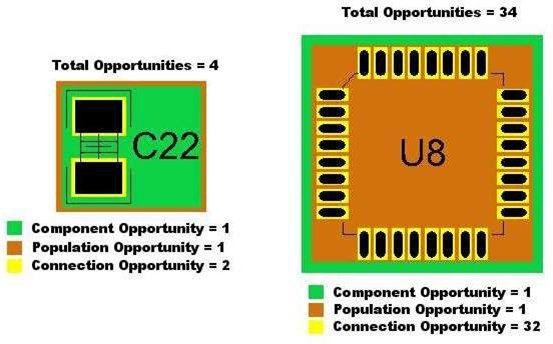
The following illustration shows how the number of opportunities for a capacitor and IC are calculated.